
Build your own arcade
Arcade Cabinet Blueprints: Read and Use a Plan
On this page7
Arcade cabinet blueprints need to explain how panels meet, not just show an attractive side profile. Read the front and side views together. Find the panel thickness before copying a cut list. Then check the planned display and control hardware against the internal space.
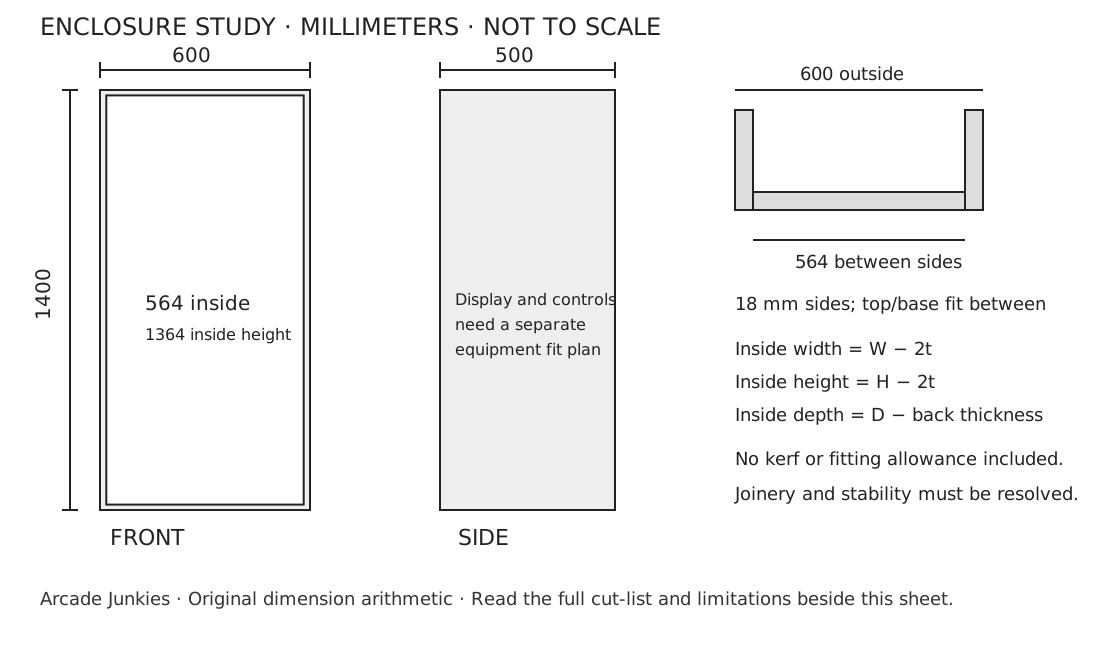
Use the original rectangular enclosure study below to check panel math. It is a planning example, not a tested cabinet or a load-rated construction design. Its outside width is 600 mm with 18 mm sides, leaving 564 mm between them. Changing sheet thickness changes that inside width. Verify the real parts and joinery before turning a drawing into a build.
Read arcade cabinet blueprints in three views
The front view establishes outside width and the height of openings. The side view shows front-to-back space and any sloping surfaces. A top or section view shows which panel overlaps which. A plan missing that last view can leave a cut-list dimension open to two different readings.
Treat each written dimension as a statement to check. Mark whether it is an outside size, inside opening or cut length. A 600 mm outside cabinet does not provide a 600 mm shelf opening when solid sides occupy part of that width. Likewise, a screen's diagonal is not the width of the opening it needs.
Keep the drawing's units on every sheet. Do not mix inches from a display manual with millimeters from a wood plan. Convert once, write the converted number and keep the original beside it. The exact conversion is 25.4 millimeters per inch.
Original upright enclosure study
This is a plain rectangular shell to make the joints easy to audit. It does not reproduce another builder's plan, a game cabinet outline or a maker's drawing. The front remains open in the study. Control-panel height and the display bracket must be designed around your actual equipment.
| Panel | Quantity | Finished size | Position |
|---|---|---|---|
| A: side | 2 | 1400 × 500 mm | Full-height outside sides |
| B: top and base | 2 | 564 × 500 mm | Between the 18 mm sides |
| C: inset back study | 1 | 564 × 1364 mm | Between the side panels and the top/base pair; rear face flush |
| D: full-depth shelf study | As needed | 564 × 482 mm before fitting gap | From the open front to the inside face of the back |
Scroll for more →
The arithmetic uses butt joints and actual 18 mm stock. Inside width is 600 minus twice 18, which is 564 mm. Inside height is 1400 minus twice 18, which is 1364 mm. With an inset 18 mm back at the rear of a 500 mm-deep side, the remaining inside depth is 482 mm.
Those are ideal geometric sizes. They include no machining tolerance, finish build-up or removable-panel gap. A shelf needs a real fitting gap chosen for its material and fixing method. The back study does not specify ventilation openings or establish that a full back alone provides enough bracing.
Download the original SVG dimension sheet for a clear reference. It is a reduced-scale drawing, not a full-size cutting template. Use the written dimensions. Do not measure a panel length from a browser printout.
Make the cut list match your chosen material
Replace the study's thickness with the measured stock thickness before reusing its equations. For between-side panels, inside width equals outside width minus two side thicknesses. For a panel that covers the outside faces, that equation is wrong. The joint detail determines the calculation.
List quantity and finished size before laying parts onto a sheet. Add kerf, the material the blade removes, between adjacent cuts. A layout that uses the entire sheet with no gaps cannot produce full-size neighboring panels from a real saw. Keep a little offcut for a button and finish trial.
Use the wood guide to compare sheet behavior. The APA plywood explanation describes layered panel construction. It does not make every plywood sheet interchangeable. Record the actual grade and thickness of the product you use.
For a bartop, start a separate drawing with its supporting furniture. Do not shrink the upright study by a percentage. The screen and controls keep their real sizes. The tabletop must also have enough usable area for the complete base and the chosen player position.
Check the display and controls, then service access
Put the display's complete case and sourced bracket on the side view. Add the plugs at their actual positions. A socket on the back of a screen may need more room than the display case itself. Leave a route for removal without taking the whole cabinet apart.
Next add the control hardware below the panel. Show the joystick plate, button nuts and wire connections. A shallow front may look tidy in profile but leave no space for those parts. Use the button worksheet for the top view and draw the underside separately.
Choose the fastening arrangement for each joint. Write the fixing type and length beside that joint rather than writing “screws” across the whole plan. Check the fixing maker's instructions for the actual stock. The dimension study gives no generic screw spacing or cabinet load rating.
Print, measure and revise arcade cabinet blueprints
Print the reference so its labels remain legible. The written dimensions govern. If a different plan supplies a full-size pattern, verify its calibration marks before tracing it. A printer setting that fits the page can change every hole center at once.
Make a revision line whenever a part changes. Record the old size, new size and reason. If a side thickness changes, revisit all between-side panels. If the screen moves, recheck the bracket and cable route. A revised front view does not silently update an old side view.
Before cutting, confirm these points:
- Each panel has an identifier and a quantity, plus its finished size.
- Units and actual stock thickness appear on the sheet.
- The drawing shows which faces overlap.
- The display and control envelopes fit the cavity.
- Access and ventilation follow the actual equipment instructions.
- Bracing, stability and fastenings have a separate resolved plan.
Frequently asked questions
Are these ready-to-cut plans for every arcade cabinet?
No. The sheet is an original enclosure study that makes panel math visible. It has no tested load rating or universal hardware fit. Use it to check the relationship between outside size and internal panels. Your complete build still needs resolved bracing and mounting, as well as access and equipment-specific clearances.
Why not scale a classic cabinet outline?
Scaling changes control height, screen space and internal clearances at the same time. Real buttons and mounting plates do not shrink with the outline. Begin with the actual hardware, then set the enclosure around it. Use a full-size hand-position mockup before accepting the control-panel location.
Do I add blade width to every panel size?
The cut list states the finished part size. Kerf belongs in the sheet layout and cutting sequence so the blade does not remove material from a neighboring finished part. Check the saw setup with an offcut. Do not add one generic kerf number to every outside dimension.
What should I do when a plan has no thickness?
Do not treat its cut list as complete. Identify how each joint works, choose actual material and recalculate the pieces. A shelf designed to sit between two sides depends on both side thicknesses. If the missing detail affects the display mount or base, resolve it before cutting.
Verdict
Good arcade cabinet blueprints expose their assumptions. Keep written dimensions, panel joints and actual stock thickness together. Use the full cabinet build sequence to turn the checked plan into an ordered set of cuts, dry fits and installation checks.