
Arcade controls and upgrades
3 Arcade Buttons: Sizes, Switches and Panel Fit in 2026
The short answer
Choose Ultralux for illumination, Classic for a plain microswitch button or GoldLeaf for an integral leaf switch. Match the maker’s drawing, panel stack and connector before ordering.
Our top 3 picks
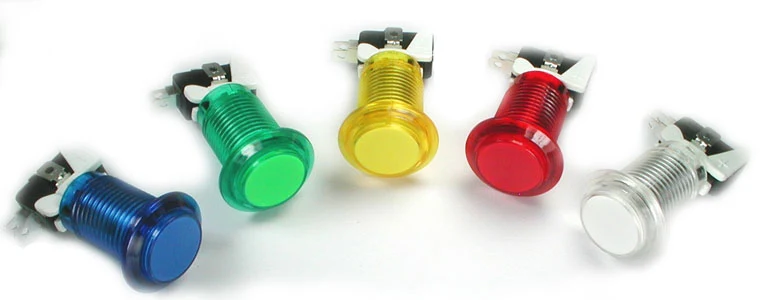 1Illuminated controlsUltimarc Ultralux Illuminated Pushbutton
- 28–30 mm mounting hole
- 4.8 mm switch terminals
 2Plain mechanical switchUltimarc Classic Pushbutton
- Non-illuminated microswitch button
- For panels up to 20 mm thick
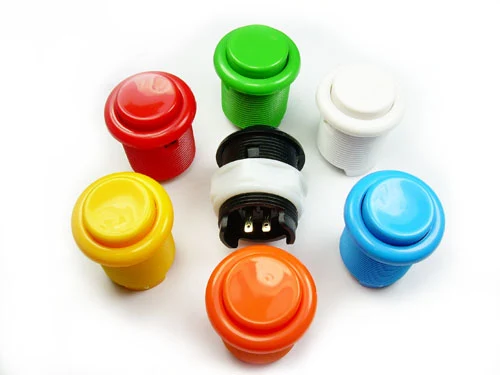 3Integral leaf switchUltimarc GoldLeaf Pushbutton
- For panels up to 19 mm thick
- 2.8 mm switch terminals
Arcade buttons should be chosen by the hole and panel they must fit. Color comes later. The three sets below cover different mounting sizes and switch arrangements. They are not interchangeable.
Start with a record of your panel, then compare the exact part with its drawing before ordering or cutting wood.
#1. Ultimarc Ultralux Illuminated Pushbutton
Ultimarc Ultralux Illuminated Pushbutton
Our verdict:
Illuminated controls
For a panel needing separately powered illuminated action buttons.
View at Ultimarc- 28–30 mm mounting hole
- 4.8 mm switch terminals
Keep in mind: Confirm the lamp supply and switch connectors for your selected variant.
Choose Ultralux when the panel needs illuminated buttons. Ultimarc specifies a 28–30 mm mounting hole, 4.8 mm switch tags and separate lamp connections. Its standard lamp uses a 5 V supply; RGB versions have their own wiring option. These maker specifications were checked on 31 October 2026.
The trade-off is the additional lamp circuit. Match the exact variant and its instructions before connecting anything. A working light does not prove the switch reaches the game. Obtain the full mounting drawing before making a panel cut.
#2. Ultimarc Classic Pushbutton
Our verdict:
Plain mechanical switch
For a plain action-button layout where illumination is unnecessary.
View at Ultimarc- Non-illuminated microswitch button
- For panels up to 20 mm thick
Keep in mind: Only the orange variant showed stock on 31 October 2026; check your chosen colour.
The Classic is the plain, non-illuminated alternative. It avoids an LED supply but still needs the correct switch connection and room under the panel. The maker showed the orange variant available on 31 October 2026; the other displayed colours were unavailable. Choose an available colour deliberately, rather than assuming every variation ships.
Use the maker’s exact fixing and switch details for the chosen part. We do not assign a tested feel or durability score to it.
#3. Ultimarc GoldLeaf Pushbutton
Our verdict:
Integral leaf switch
For a panel needing an integral leaf switch and threaded fixing.
View at Ultimarc- For panels up to 19 mm thick
- 2.8 mm switch terminals
Keep in mind: Confirm the cutout and cable space before drilling.
GoldLeaf uses an integral leaf switch and a threaded retaining nut. The maker specifies panels up to 19 mm and 2.8 mm switch tags, checked on 31 October 2026. This offers a different switch arrangement from the Classic; it does not prove a preferred feel for every player.
Confirm the actual cutout, finished panel thickness and room for the connected cable. The panel-thickness allowance is not a hole diameter. Keep the standard and illuminated GoldLeaf variants separate when ordering.
Factors to consider when choosing arcade buttons
The panel is the fixed part of a replacement job. Record the hole before browsing. For a new panel, keep the hole size undecided until the chosen button has a drawing. A named diameter can describe the opening or the top; they are different measurements.
Panel thickness includes every layer. An overlay or clear cover can leave less thread for the nut. Check the finished stack, with the real holding parts, rather than bare wood alone. A snap-in mount needs its own thickness range; do not borrow the range from a screw-in button.
The switch and cable need room beneath the panel. Include the connector as well as the body. A shelf directly below the controls can block the cable even when the button itself clears it. Leave service access so a failed switch can be reached later.
| Check | Record | Decision |
|---|---|---|
| Opening | Exact maker cutout or measured hole | Keep conflicting values unresolved |
| Panel stack | Wood plus cover and overlay | Compare with the part's holding range |
| Space below | Body and connected cable | Check shelves and nearby parts |
| Connection | Switch terminal and matching cable end | Confirm both size and wiring purpose |
Scroll for more →
Match arcade buttons to the encoder and game
A button is an input, not a complete control system. The encoder turns a switch event into a signal for the host. Check the encoder instructions and the game's mapping separately. An advertised list of computers does not confirm the whole cabinet.
For an illuminated build, keep the lamp circuit separate from the switch record. Use the exact part's instructions for its supply and connections. No shared rule about LED voltage applies to every button here. If those instructions are missing, resolve them before connecting power.
Use a paper layout to compare reach and spacing. This helps decide where the controls should sit without making a hole. The final cut still depends on the selected part. Our button layout guide keeps that planning task separate from the purchase.
Frequently asked questions
Is the button's top width the hole size?
No. A rim or plunger can be wider than the body that passes through the panel. Use the specified cutout for the exact part. A mounting-hole range is not the button’s visible top width; confirm the drawing first.
Are these replacement Sanwa parts?
They are Ultimarc products. Compare their own drawings with the panel; a similar diameter does not establish compatibility with a Sanwa mounting system.
Does a switch-cycle rating prove better feel?
No. It is not a measurement of feel or of lifespan in your cabinet. We have not run a comparison test. Choose using stated fit and the switch arrangement you need.
Verdict
Choose arcade buttons only after resolving the panel and cable fit. Ultralux adds a lamp-supply check. Classic availability depends on colour, while GoldLeaf uses a different switch arrangement.
Each replacement needs its own mounting check. No set is the right choice for every panel. If you cannot obtain the missing drawing, keep that part off the cutting list. Continue with arcade controls and the control-system guide to check the rest of the signal path.